Set up a loyalty program
Choose how guests earn points, configure bonuses, and start enrolling members.
Follow a guest from enrollment to reward redemption
Use the loyalty program to reward guests for eligible direct and staff-entered bookings. Guests can earn points, receive bonuses, redeem configured rewards, and refer new guests.
Permissions
- Manage Products & Pricing is required to open Settings → Loyalty and configure the program.
- Staff can enroll guests without an additional capability after the program is active.
The property must have the loyalty program and property management system enabled. The property owner can grant capabilities under Settings → User Groups.
Before you start
You need access to manage products and pricing. If Settings → Loyalty is not visible, ask a property administrator or Comfortly support to check your access and enable the feature.
Decide these details before turning the program on:
- How many points guests earn per currency unit
- Whether staff-entered bookings earn points
- Signup, first-booking, and referral bonuses
- When unused points expire
- Whether loyalty rewards can be combined with other discounts
- The terms guests must see
Set up the program
- Open Settings.
- Under Reservations, select Loyalty.
- Enter the earning and bonus settings described below.
- Review the loyalty terms.
- Turn on Enable loyalty program.
- Select Save.
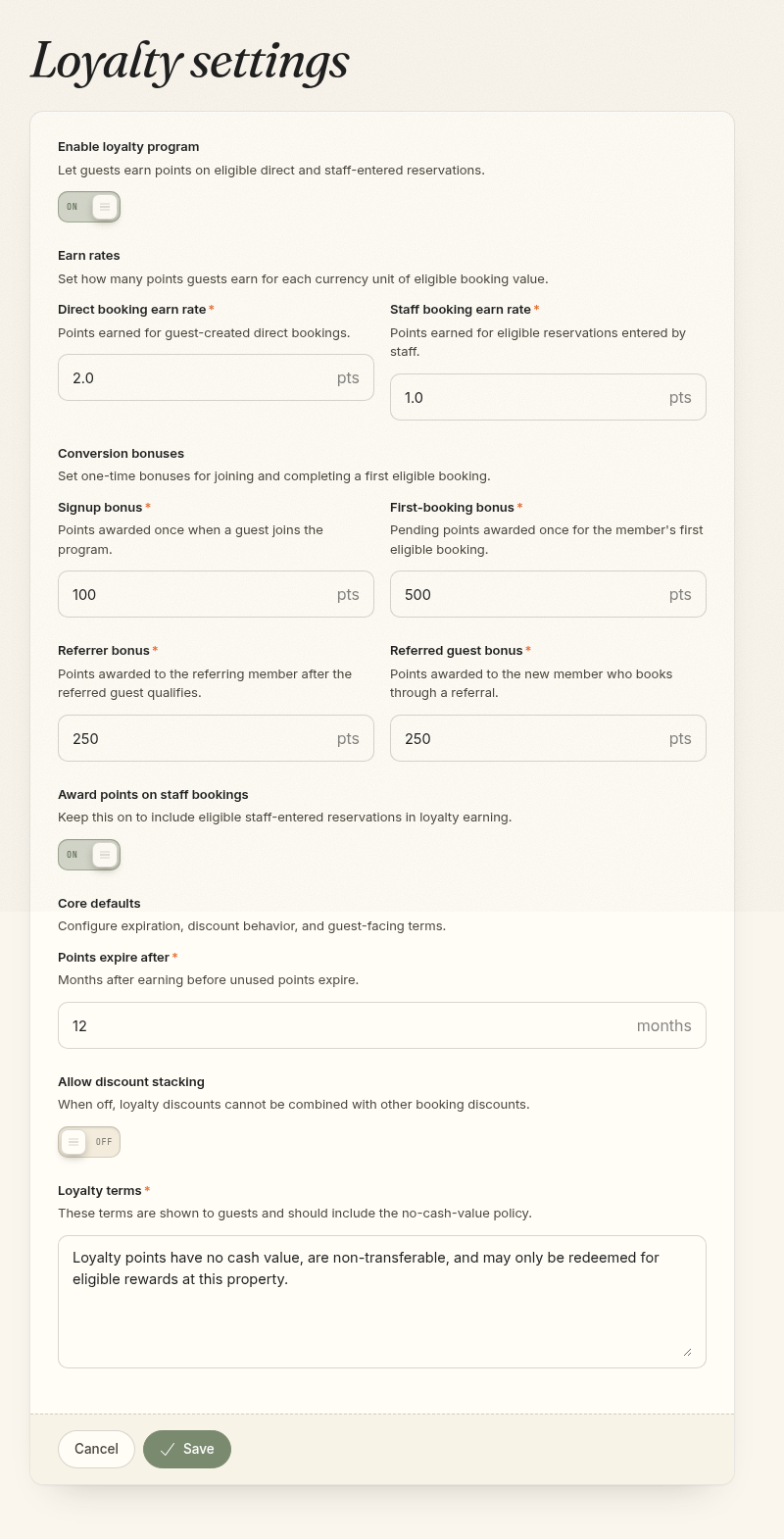
Earn rates
- Direct booking earn rate: Points earned per currency unit on guest-created direct bookings.
- Staff booking earn rate: Points earned per currency unit on eligible bookings entered by staff.
- Award points on staff bookings: Turn this off if only guest-created direct bookings should earn points.
For example, an earn rate of 2 awards 200 points on $100 of eligible booking value.
Eligible value includes room, product, and package charges after discounts. Taxes, payments, refunds, OTA bookings, and imported bookings do not earn points.
Bonuses
- Signup bonus: Available points awarded once when a guest joins.
- First-booking bonus: Awarded once for the member's first eligible booking. These points remain pending until the stay is checked out and paid in full.
- Referrer bonus: Awarded to an existing member after a referred guest completes a qualifying first booking.
- Referred guest bonus: Awarded to the new member after that same booking qualifies.
Enter 0 to turn off any bonus.
Core defaults
- Points expire after: The number of months available points remain valid.
- Allow discount stacking: This setting is shown in the current setup screen, but loyalty rewards are still blocked when another booking discount is present. Contact Comfortly support before planning a stacking promotion.
- Loyalty terms: Guest-facing terms shown during enrollment and in loyalty views. Keep the no-cash-value language and add any property-specific rules.
Set product earning rates
Products earn at the standard booking rate unless their product type has a different multiplier.
- Open Settings → Product Types.
- Create or edit a product type.
- Set its Loyalty earn multiplier:
1for the standard rate2for double points0to exclude products in that type
- Select Save changes.
Enroll a guest
Guests can choose to join while completing a direct booking. Staff can also enroll a guest:
- Open Guests and select the guest, or open one of the guest's bookings.
- Find the Loyalty card.
- If a signup bonus is configured, choose whether to award it.
- Select Enroll guest.
The loyalty card then shows available points, pending points, the member number, referral details, and recent activity. A guest can also see their loyalty details from a secure booking-management link.
How points become available
Booking points first appear as pending. They become available after all of these are true:
- The booking is eligible and has not been canceled.
- The guest is an active loyalty member.
- The stay is checked out.
- The scheduled checkout date has arrived.
- The booking is paid in full.
Booking changes, cancellations, and refunds can reduce or reverse points. Points expire based on the program's expiration setting.
Referrals
Each member receives a referral code and booking link. Staff can open the link from the guest's Loyalty card, and guests can access it from booking management.
Referral bonuses are awarded only when the referred guest joins the program and completes a qualifying first direct or eligible staff-entered booking. Self-referrals and referrals for existing members do not qualify.
Rewards
Configured booking-discount and package rewards appear on eligible booking and direct-checkout screens when a member has enough available points.
The current Loyalty settings screen does not create or edit reward options. Contact Comfortly support if reward options need to be added or changed.
Pause the program
Contact Comfortly support before turning off an active program. Disabling it stops earning and redemption, and a later loyalty lifecycle update can reverse pending booking points. Member and point history remains recorded, but pending balances may change.